
Technical SEO Services
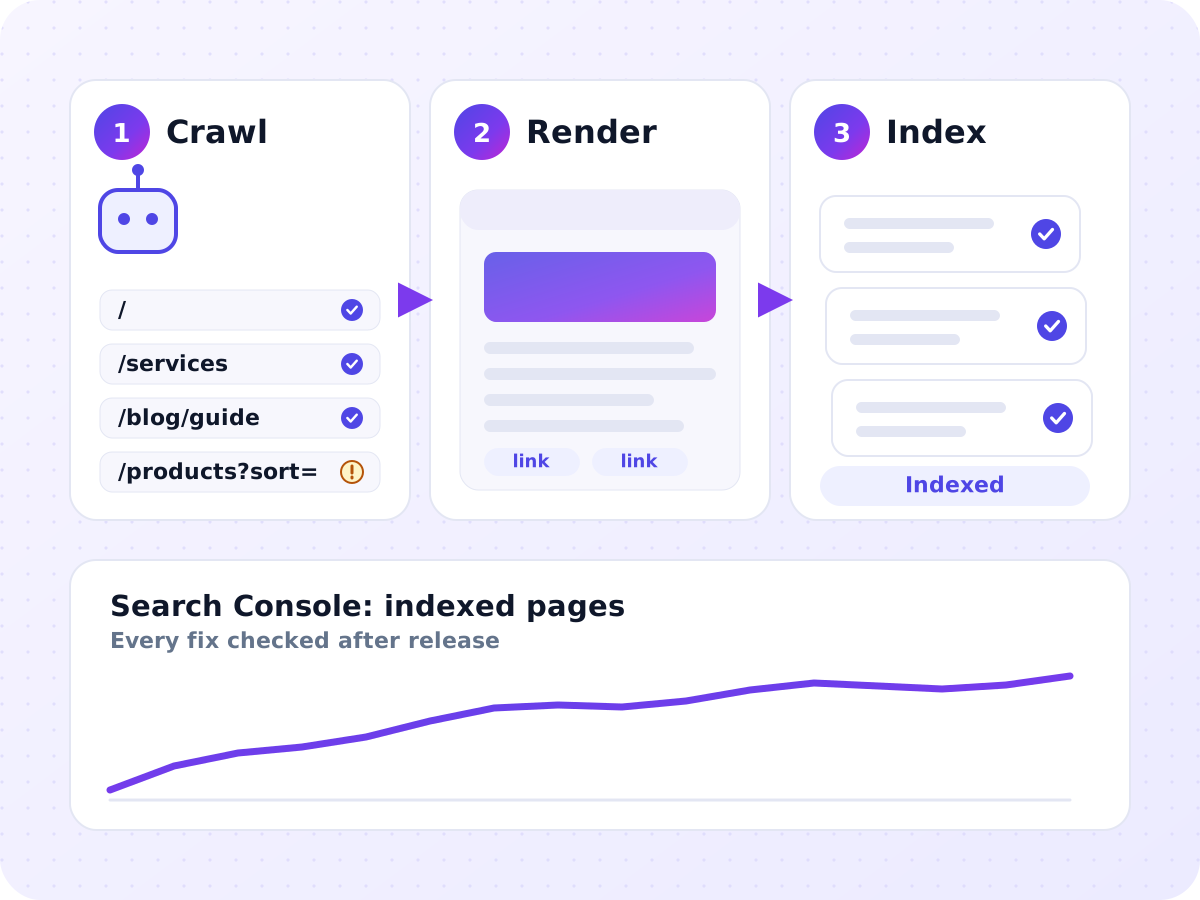
Good content can't rank if Google can't reach it, read it or decide which version to keep. I find what stops search engines from crawling, rendering and indexing your site, then fix it in order of impact, or hand your developer tickets clear enough to fix it right the first time.
Every fix is checked in Search Console after release. No health-score reports, no tool exports without explanation.
- 6+ years of experience
- 30+ clients served
- Completed Koray's Topical Authority course
Signs your site has technical SEO problems
- New pages take weeks to appear in Google, or never do.
- Search Console shows thousands of URLs you never meant to create.
- Google picks a different canonical than the page you chose.
- Pages show "Discovered - currently not indexed" or "Crawled - currently not indexed" in large numbers.
- Your Core Web Vitals fail for real visitors on mobile.
- Traffic dropped after a redesign, a platform change or a domain move.
- Your site is built with JavaScript, and nobody has checked what Google actually sees.
What I check and fix
Every site is checked across the same areas, and every fix is ranked by how much it matters for your pages that earn money.
Crawling
- What usually goes wrong
- Important pages are blocked, buried deep or only reachable through scripts
- What I fix
- robots.txt rules, internal links and navigation, so key pages are a few clicks from the homepage
Rendering
- What usually goes wrong
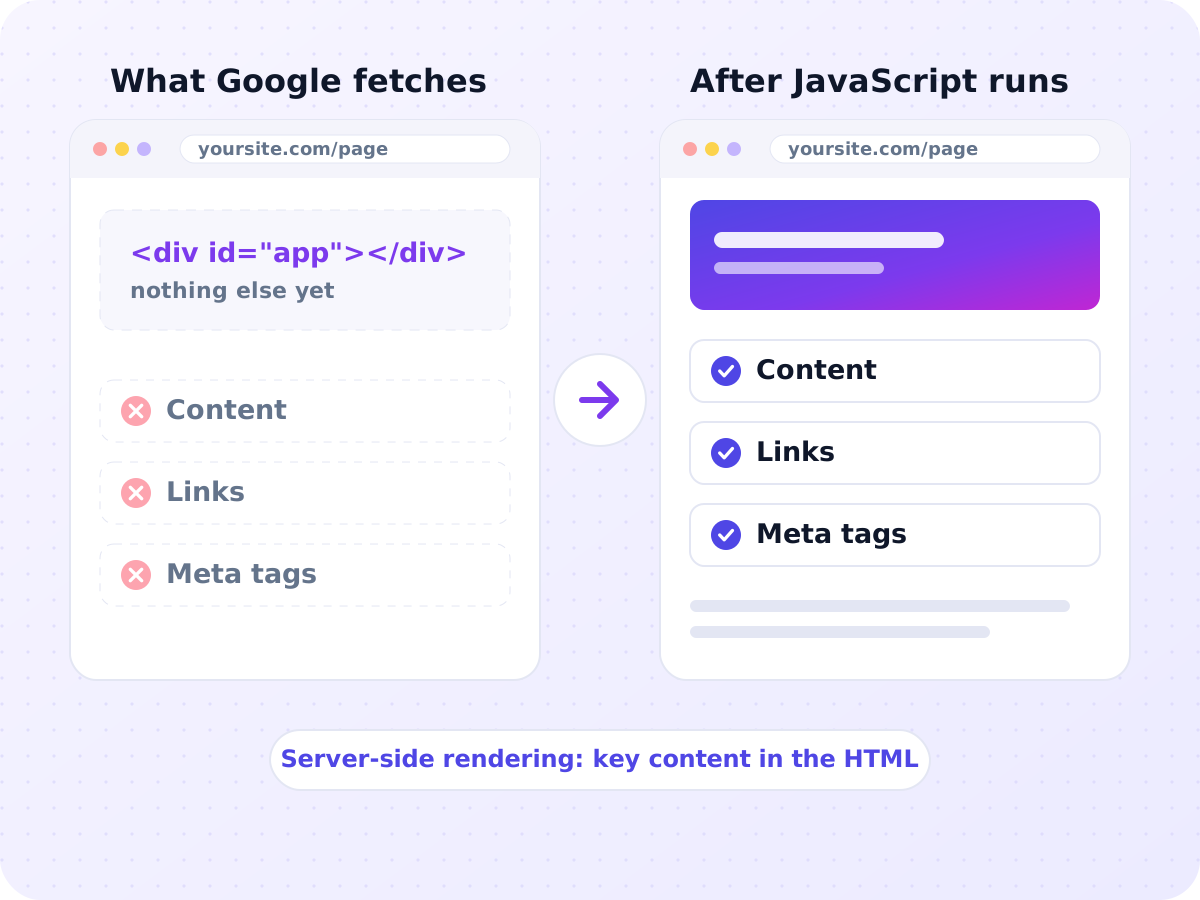
- Content or links only appear after JavaScript runs, or need a click
- What I fix
- Server-side or static rendering for key content, and checks of what Google actually renders
Indexing
- What usually goes wrong
- Thin, duplicate or error pages crowd out the pages you want indexed
- What I fix
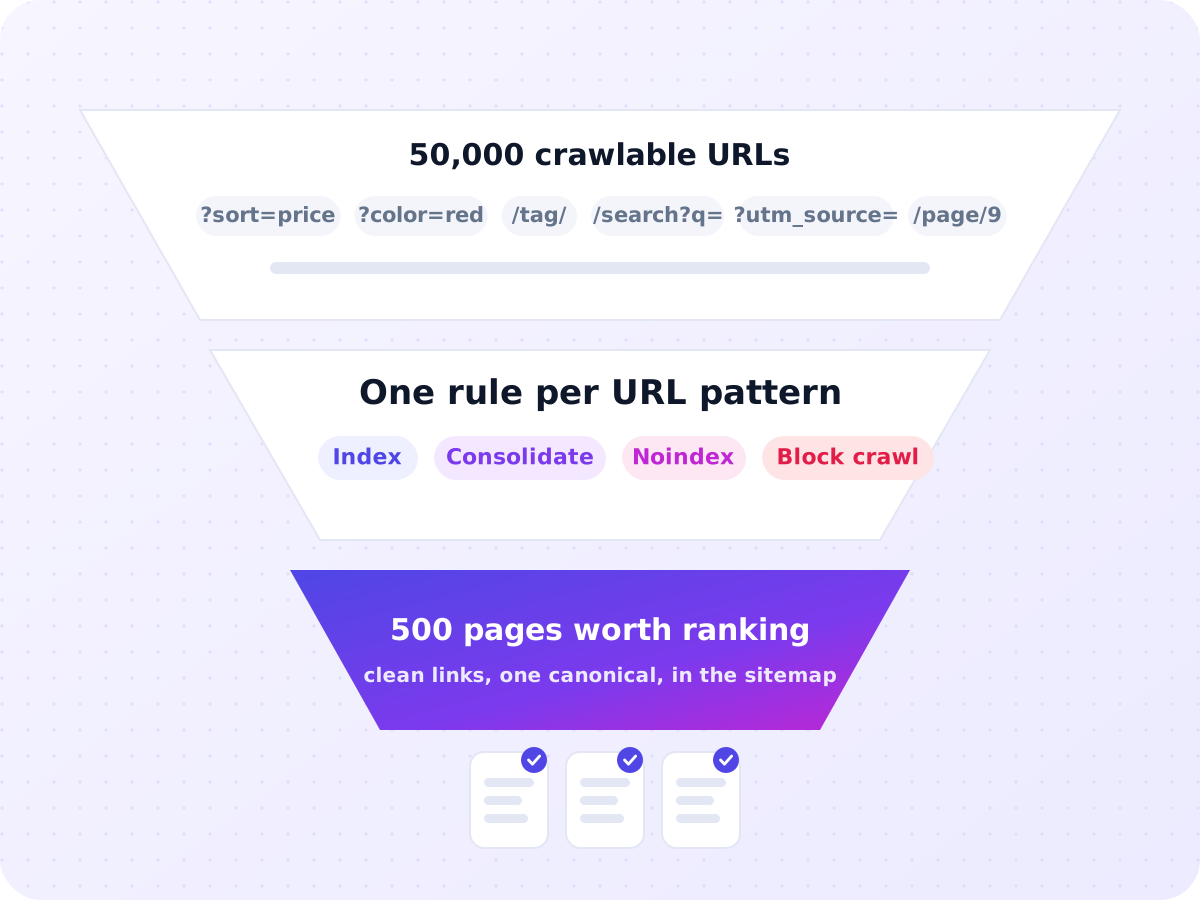
- An indexation plan: which URL patterns to index, consolidate, noindex or block
Canonicals and duplicates
- What usually goes wrong
- Filters, parameters, archives and variants create copies of the same page
- What I fix
- One canonical per page, and signals that agree with it
Redirects and status codes
- What usually goes wrong
- Chains, temporary redirects used for permanent moves, error pages returning 200
- What I fix
- Direct permanent redirects, correct 404 and 410 responses, no soft 404s
Sitemaps and robots.txt
- What usually goes wrong
- Sitemaps list redirected or noindexed URLs; robots.txt used to hide pages
- What I fix
- Sitemaps with only canonical, indexable pages; robots.txt used only for crawling
Speed
- What usually goes wrong
- Large hero images, heavy scripts, layout shifts
- What I fix
- Fixes for the elements behind each failing Core Web Vital, template by template
Architecture
- What usually goes wrong
- Flat or tangled structure that hides money pages
- What I fix
- URL structure, hub pages and internal links that match your topics
Structured data
- What usually goes wrong
- Missing, broken or misleading markup
- What I fix
- Valid schema that matches what the page shows
International sites
- What usually goes wrong
- Wrong language versions shown, automatic redirects by location
- What I fix
- hreflang, one URL per language or region, and no forced redirects
In Koray's terms, this lowers your site's "cost of retrieval": the less work it takes Google to find and understand your pages, the more of them it keeps and trusts.
JavaScript sites that Google can read
Google can run JavaScript, but it renders pages later and not always fully. Other crawlers, including many AI crawlers, can't run it at all. So I check what each important template looks like before and after scripts run. When key content, links or meta tags exist only after rendering, I recommend server-side or static rendering for those parts. WordPress and Shopify usually render on the server already. Problems there come from page builders, apps and add-ons. Making your content readable without scripts also helps with AI Search Optimization.
One clean URL for every page worth ranking
Most indexing problems come from too many URLs, not too few. Filters, sort options, internal search, tag archives and tracking parameters can turn 500 real pages into 50,000 crawlable ones. I map every URL pattern on your site and give each one a single rule. The pages you want ranked get clean internal links, a self-referencing canonical and a place in the sitemap. Everything else is consolidated, kept out of the index or kept away from crawlers, depending on what it is. Online stores with filters and variants get extra attention, which my Ecommerce SEO work covers in more depth.
Speed fixed for real visitors, not a lab score
Google's good thresholds are a Largest Contentful Paint within 2.5 seconds, an Interaction to Next Paint under 200 milliseconds and a Cumulative Layout Shift under 0.1, measured on real visits. I work from that real-visitor data in Search Console and PageSpeed Insights, template by template, and trace each failing metric to the image, script or font behind it. A lab score of 100 is not the goal. A product template that fails for real mobile visitors matters far more than moving a Lighthouse score from 92 to 100.
- ≤ 2.5 s
Largest Contentful Paint
- < 200 ms
Interaction to Next Paint
- < 0.1
Cumulative Layout Shift
Migrations without losing your rankings
Redesigns, platform changes and domain moves are where sites lose the most traffic, usually because old URLs go missing.
Before launch
I record every URL that has traffic, rankings or links, and map each one to its new home with a permanent redirect.
On staging
I check redirects, canonicals, robots rules and rendering.
On launch day
I make sure the staging blocks are gone and the redirects work.
For the weeks after
I watch indexing, crawl errors and rankings, and fix anything that slipped.
WordPress and Shopify, side by side
| WordPress | Shopify | |
|---|---|---|
| Server control | Full control over hosting, caching and settings | None. Hosting and CDN are managed by Shopify |
| robots.txt | Set by WordPress, an SEO plugin or a real file | Edited through the robots.txt.liquid template |
| XML sitemaps | Basic core sitemap, usually replaced by a plugin | Created automatically, not directly editable |
| Common duplicates | Tag, author, date, search and attachment archives | Products reached through collection paths, tag-filtered collections, blog tags |
| Redirects | Server rules or a redirect plugin | Admin redirects, which only work once the old URL is gone |
| Main speed risk | Page builders and plugins loading scripts on every page | App scripts added to the theme, sometimes left behind after uninstalling |
Mistakes I fix most often
- Removing noindex with JavaScript. Google may skip rendering a page with noindex, so it never sees the change. The tag has to go from the original HTML.
- Using robots.txt to remove pages. robots.txt stops crawling, not indexing. A blocked page can stay in Google. Noindex or removal works; blocking doesn't.
- Canonicals pointing at redirected, noindexed or broken URLs. Google ignores signals that contradict each other.
- Temporary redirects for permanent moves. Only permanent redirects tell Google which URL to keep.
- Staging blocks left live after launch. One leftover noindex or robots rule can remove a whole site.
- Chasing a perfect lab score while real visitors still wait.
Results measured in Search Console, not health scores
Tool health scores count issues, not impact. I measure what changes for your business:
- Indexed pages per sitemap,
so you see whether the pages you care about are in Google.
- Crawl activity
in Search Console's Crawl Stats, and in server logs where available.
- Time to index
for new pages.
- Core Web Vitals by template,
from real-visitor data.
- Organic clicks to fixed templates,
compared before and after release.
What you receive
Every issue with evidence, affected templates and priority.
One task per fix, with steps and acceptance checks.
Every URL pattern and its rule.
Old-to-new pairs with no chains.
Cleaned and tested.
The element or script behind each failing metric.
Proof that fixes are live and nothing else broke.
How it works, step by step
Access and crawl
Days 1 to 3You share Search Console, analytics and CMS or hosting access. I crawl the site and ask for server logs if you have them.
Diagnosis
Weeks 1 to 2Crawl, log and Search Console data are compared to find wasted crawling, index gaps, rendering problems and slow templates.
Prioritized plan
Week 2Fixes are grouped by template and ranked by impact and effort. We agree who fixes what.
Fixes
Weeks 3 to 8I make CMS, theme and plugin changes myself and write tickets for code changes. Staging is reviewed where you have one.
Validation
Weeks 6 to 10Each fix is confirmed in Search Console, recrawls and real-visitor data.
Monitoring
Monthly, optionalIndexing, crawl activity and speed are reviewed, and every release is checked before it can do damage.
Each industry has its own rules, and some can’t run ads. See the industries I work in.
Ways to work together
Technical audit and fix plan
For sites with a developer ready to make changes.
The full audit, prioritized developer tickets, a recorded walkthrough and a review after release.
Audit plus fixes
For owners without technical help.
Everything above, plus CMS, theme and plugin fixes, redirects, sitemaps and robots.txt made by me, and validation in Search Console.
Migration support
For redesigns, platform changes and domain moves.
Pre-launch URL record, redirect map, staging review, launch-day checks and eight weeks of monitoring after launch.
Who this is for, and who it isn't
A good fit if you
- have hundreds or thousands of URLs
- run a Shopify or WooCommerce store slowed by apps
- use a JavaScript or headless build
- are planning a redesign or migration
- have a developer who needs clear instructions
Not a good fit if you
- have a small brochure site with no indexing problems
- expect a speed score alone to lift rankings
- have no way to change your site's code or settings
Technical SEO by industry
- Kratom and CBD stores:
age gates, payment scripts and lab report files that Google must still be able to reach.
- Movers:
templated location and route pages that need clean indexing, and quote forms that don't slow pages down.
- Self storage:
unit prices and availability loaded by JavaScript or iframes that Google may not see.
- Jewelry stores:
image-heavy galleries and filter combinations that multiply URLs.
- Law firms:
heavy page builders, chat widgets and redirects left broken after site rebuilds.
More on each: the industries I work in.
Technical SEO questions
Do Core Web Vitals affect rankings?
Google recommends good Core Web Vitals and says they align with what its ranking systems reward, but it doesn't say how much they weigh. Treat them as one factor among many. The stronger reason to fix them is that faster pages sell more.
Should a small site worry about crawl budget?
Usually not. Google's crawl budget guide is for sites with about a million pages, or 10,000+ pages that change daily. Small sites have other crawl problems worth fixing first.
What does "Discovered - currently not indexed" mean?
Google knows the URL exists but hasn't crawled it yet. On most sites, the cause is weak internal links or too many low-value URLs competing for attention.
Can a site migration be done without losing rankings?
Usually, yes: with a complete redirect map, the same content and internal links, a record of what ranked before, and close checks after launch. A short dip can still happen while Google processes the move.
Will a faster host improve my rankings?
Only if the server is the bottleneck. Most slow pages are slow because of images, scripts and fonts, not hosting.
Are 404 errors bad for SEO?
Not by themselves. A 404 for a page that should be gone is correct. They matter when the missing URL had links, traffic or internal links, and then it gets redirected.
Do you make the fixes, or does my developer?
Either. I make changes in WordPress, Shopify and most CMS settings myself. For code changes, I write tickets your developer can follow and check the result.
Are you a technical SEO agency?
I'm a consultant, not an agency. You work directly with the person who audits your site and checks every fix.
Find out what's stopping Google from seeing your site.
Book a free 30-minute call. We go through your site together, and I show you the 3 technical fixes that matter most, ranked by impact.